Catalogue of composite track elements: Difference between revisions
No edit summary |
No edit summary |
||
| Line 51: | Line 51: | ||
File:0corner.png|Two example tracks, as a square and a circle | File:0corner.png|Two example tracks, as a square and a circle | ||
</gallery> | </gallery> | ||
Special combo's | |||
<gallery> | |||
File:0combo.png|A compilation of corner combinations | |||
</gallery> | |||
===U-turns (180° corners)=== | ===U-turns (180° corners)=== | ||
Revision as of 13:21, 10 April 2024
Introduction
A composite track element can be seen as a track element that is built up out of a combination of different track elements. This article offers lots of possible combinations. Often using the technique of the Illusion_track.
Many times, chicanes are used. This is because the chicane acts like it has asphalt all over. It could be imagined like a 2x2 full asphalt tile.
The catalogue
When executing a composite track element, you may skip up to two track elements without receiving penalty time. When you see a yellow square in the image, it means there are overlapping track elements at that location. Rotating them or mirroring the track may make them illegal. Mirroring them may make them more badly rendered.
Sometimes, the whole track isn't shown and finish lines may then have been added solely to clarify the path that's meant to be taken.

Jumps
-
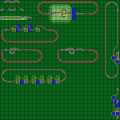 Compilation of jumps

Drops
Flying off a bridge. More of these are to be found in the Spins (Helixes) section.
-
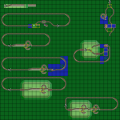 Compilation of drops

Bridge in the way
Flying in the air with bridges in the way
-
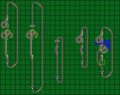 Compilation

90° corners
Small 90° corners
-
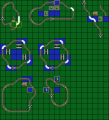 A compilation of 90° corners, from top to bottom, 1x1 corners, 1x2 corners and 2x2 corners

Big 90 degree corners
-
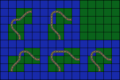 90 degree corners out of two chicanes, lower right corner uses an overlap
 -
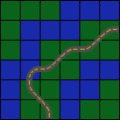 5x5 high speed corner, there are multiple ways to set it up with the chicanes
 -
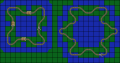 Two example tracks, as a square and a circle


Special combo's
-
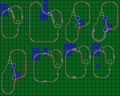 A compilation of corner combinations

U-turns (180° corners)
-
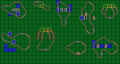 A compilation
 -
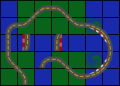 Extra: 3x1 U-turn
 -
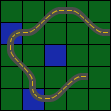 Extra: Big U-turn, there are multiple ways to set it up with the chicanes


270° corners
-
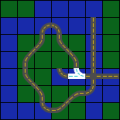 Quite 360° even
 -
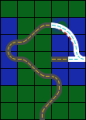 Not truly 270°, possible to do a 180° and a 90° in opposite directions. The trick is always to go over all three chicanes and to visit the middle one twice.
 -
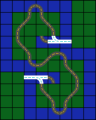 A combination of two 270° corners


Chicanes
Small chicanes + combinations of chicane and 90° corners
-
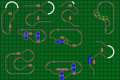 A compilation
 -
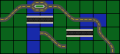 Extra: 2x1 Chicane
 -
 Extra: 2x2 Chicane as a shortcut


Big chicanes
-
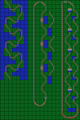 A compilation
 -
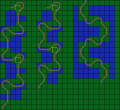 Another compilation
 -
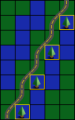 Extra: chicane with illusion track elements
 -
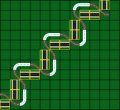 Extra: chicane with illusion track elements
 -
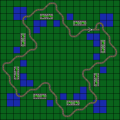 Extra: Combination of chicanes and 3x3 corners


Spins (Helixes)
-
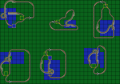 Compilation
 -
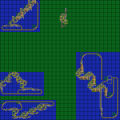 Another compilation


Special shortcuts
-
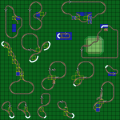 Compilation of special shortcuts
 -
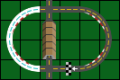 Extra: shortcut with crossroads


Special use of track elements
Features looping through a pipe to save time, taking a corkscrew at a 90° angle, humping over highway tiles or driving on a highway tile with two wheels on the road, inclined, to drive over a bit of water without sinking.
-
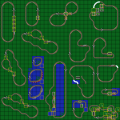 Compilation

Special trajectories
Features tracks with a dumbbell and figure-8 shape. Crossings with corners and a track that would let you go backwards through the finish line.
-
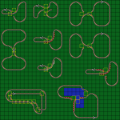 Compilation